UPI AutoPay for School Fees Rolling out on NTT Data (NDPS)

UPI AutoPay for School Fees
Approve Once. The Right Amount, Every Month.

Yes — EduGradUP school ERP has UPI AutoPay for school fees. A parent approves one UPI mandate in PhonePe, Google Pay, Paytm or their bank app, and after that each month's actual fee is debited automatically — ₹5,000 in one month, ₹200 in another, tuition, exam, transport or last month's balance included — never more than the limit the parent approved. The school decides who pays by AutoPay: normal payment only, parent's choice, or AutoPay required — for the whole school, one class or a single student. The per-debit limit and the debit date are worked out from each student's own fee plan, so parents type only their UPI id. Parents are notified 3 days before every debit, and every debit becomes a normal receipt in the day book and Tally export. Included in every plan from ₹9,000/year; money settles into the school's own NTT Data (NDPS) merchant account. UPI AutoPay is rolling out school by school to schools that collect fees online through NTT Data (NDPS).

Parents stop remembering due dates. Your office stops chasing. And you decide — school-wide, class-wise or student-wise — who pays by AutoPay.

Last updated: September 2026

🔁
Feature 1 of 8

Approve Once — Every Month Is Paid Automatically

The parent approves one UPI mandate in their own UPI app. From then on the school's fee is debited on the debit date every month — no reminders, no queue at the office, no missed months.

  • ✓Works with any UPI app that supports AutoPay — PhonePe, Google Pay, Paytm or the bank's own app
  • ✓One mandate per child, valid until the end of the academic year
  • ✓Parent approves with their UPI PIN — EduGradUP never sees bank or card details
  • ✓Parent can cancel any time from the EduGradUP app or their UPI app
📈
Feature 2 of 8

A Different Amount Every Month — Automatically Detected

School fees are not one fixed number. The mandate stores a maximum per debit, not a price, and every month EduGradUP reads the student's live dues and debits exactly that.

  • ✓₹5,000 in October, ₹200 in January — one mandate covers both
  • ✓Exam fee, transport, late fee or last month's balance are picked up automatically
  • ✓Paid at the office before the debit day? Nothing is debited for it
  • ✓Dues above the limit: the limit is collected and the rest stays due, clearly flagged
🏫
Feature 3 of 8

The School Decides: AutoPay or Normal Payment

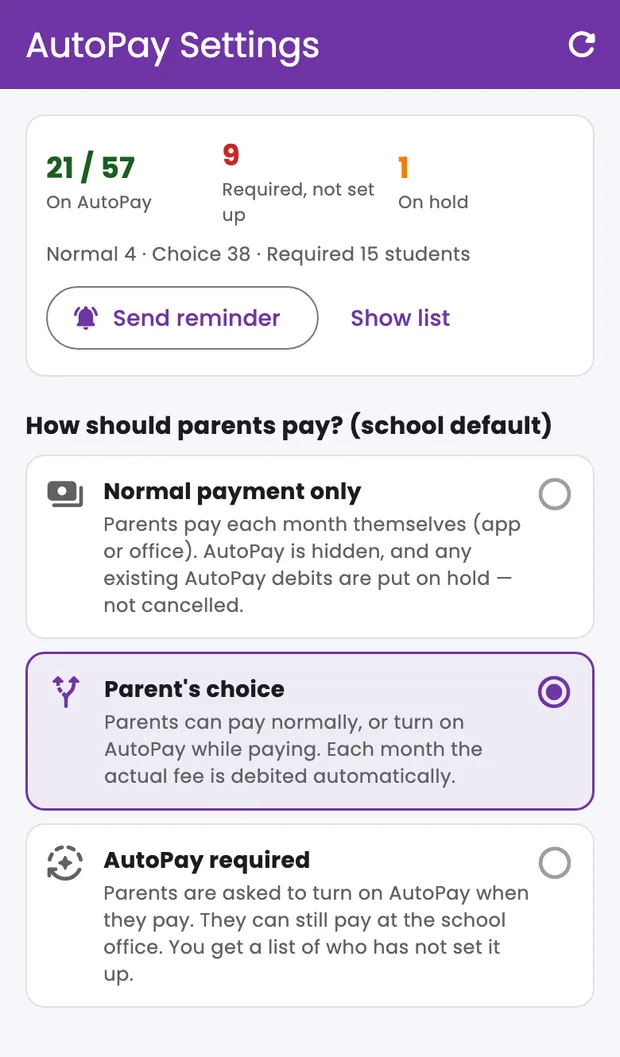
Every school is different. The admin picks how parents pay — and can change it any time from Menu → Fee Setup → Fee AutoPay → ⚙ AutoPay Settings.

  • ✓Normal payment only — AutoPay is hidden; existing AutoPay is put on hold, not cancelled
  • ✓Parent's choice — parents pay normally or turn on AutoPay while paying
  • ✓AutoPay required — parents are asked to set it up; the office counter always stays open
  • ✓Switching back from normal payment resumes debits with no new approval from parents
EduGradUP AutoPay Settings screen — coverage and the three payment modes
🎯
Feature 4 of 8

Class & Student Exceptions

Make AutoPay required for hostel or senior classes, keep one family on cheque — without changing the school default.

  • ✓Set any class to Normal payment, Parent's choice or AutoPay required
  • ✓Search any student by name or admission number and give them their own mode
  • ✓Clear priority: student exception > class exception > school default
  • ✓Changes apply immediately — undebited cycles stop, with a message to the parent
🧮
Feature 5 of 8

Limit & Debit Date Worked Out From the Fee Plan

Parents never guess a number. EduGradUP sizes the mandate from each student's own upcoming fees and the school's rules.

  • ✓Auto limit = highest upcoming month + extra room (default 20%), rounded up to ₹500
  • ✓Optional school ceiling — keep it at ₹15,000 for PIN-free debits
  • ✓Or one fixed limit for every student
  • ✓Debit date = the student's fee due date (fees due on the 29th–31st are debited on the 1st), or one fixed day
📱
Feature 6 of 8

Pay Today + Turn On AutoPay in One Flow

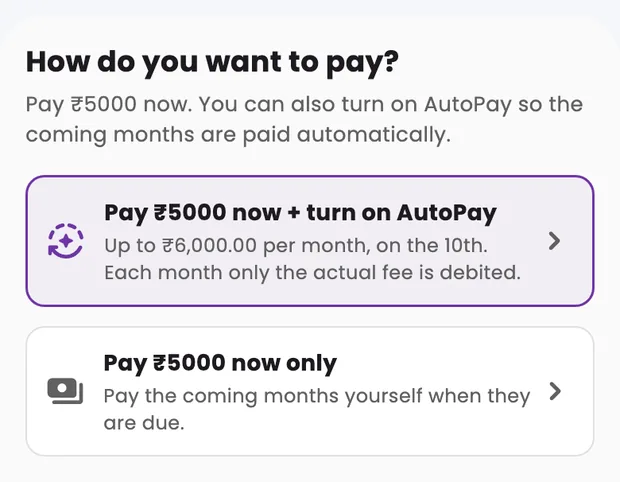
AutoPay is offered right where parents already pay. Tick the months, tap Pay Total, and choose “Pay ₹X now + turn on AutoPay”.

  • ✓The parent types only a UPI id and ticks consent — everything else is filled in by the school's rules
  • ✓Month-wise preview of what will be debited, before they agree
  • ✓Today's dues are paid immediately through secure checkout
  • ✓If the AutoPay request cannot be created, “Continue without AutoPay” keeps the payment going
EduGradUP parent app — Pay now or Pay now plus turn on AutoPay
📊
Feature 7 of 8

Admin Dashboard: Coverage, Reminders, Control

See who is on AutoPay, who still needs to set it up, and fix exceptions in a tap.

  • ✓Coverage: students on AutoPay, required-but-not-set-up, on hold
  • ✓“Show list” and one-tap “Send reminder” to every family that still needs to set up
  • ✓Pause, resume, raise the limit (parent re-approves), collect dues now, retry a failed debit
  • ✓Every mandate's debit history with amounts, dates and receipt numbers
🧾
Feature 8 of 8

Receipts & Accounting — Nothing New to Learn

An AutoPay debit is recorded exactly like a counter or online payment, so the accounts team keeps working the way it already does.

  • ✓Automatic receipt for every successful debit, visible in the parent app
  • ✓Appears in the day book, collection reports and the Tally export
  • ✓Receipts are written only after the bank confirms the debit
  • ✓Anything debited above the live dues goes to the student's advance wallet, never lost

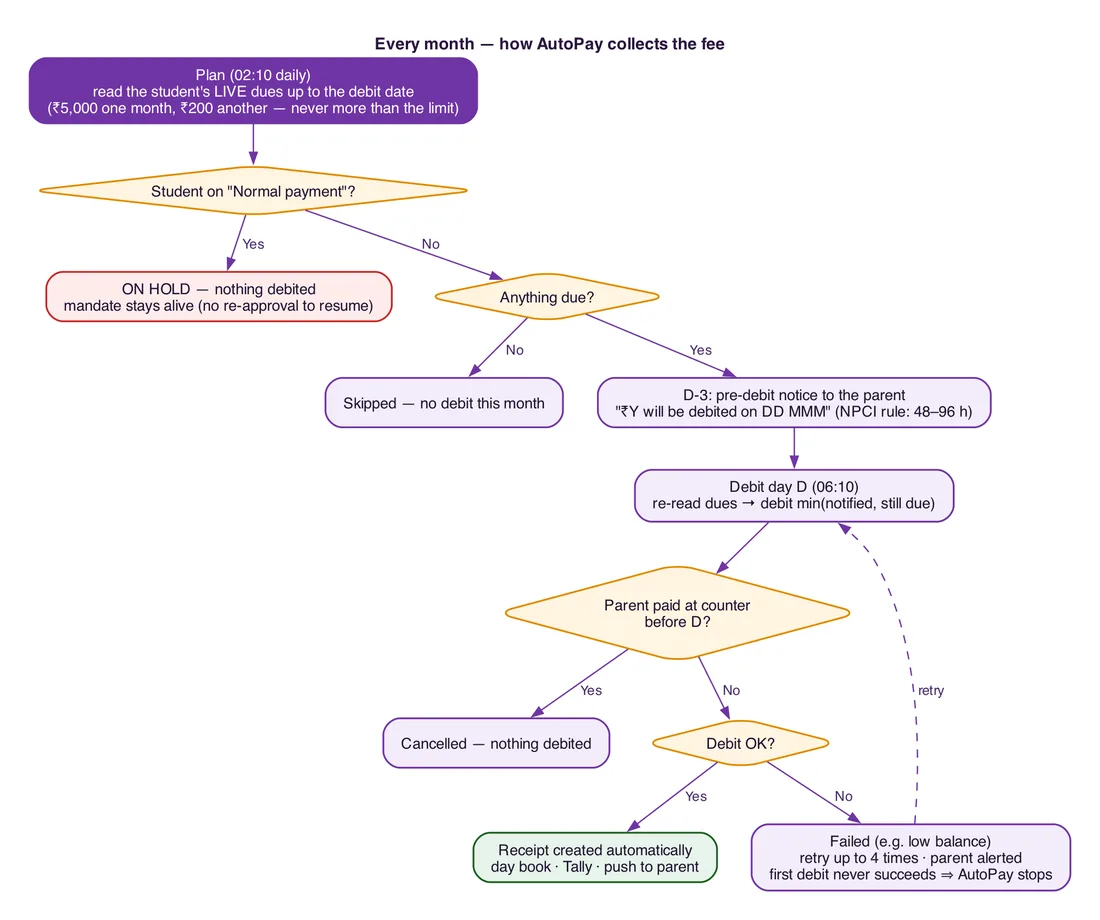
How UPI AutoPay Works Every Month

Four steps, run automatically for every family on AutoPay.

1

Price the month

EduGradUP reads the student's live dues up to the debit date — capped at the approved limit.

2

Notify 3 days ahead

The parent is told “₹Y will be debited on DD MMM”, as NPCI requires before every debit.

3

Debit on the date

Dues are re-checked; the smaller of “notified” and “still due” is debited. Paid already? Nothing is taken.

4

Receipt or retry

Success writes the receipt automatically; a failed debit is retried and the parent is alerted.

Flowchart: how EduGradUP UPI AutoPay collects school fees every month

🔒 Money-Safety Rules Built In

  • ✓Never debits more than the amount the parent was notified
  • ✓Never debits a fee that is already paid
  • ✓A receipt is written only after the bank confirms the debit — bank callbacks are re-verified with the bank first
  • ✓One debit per month per mandate — no double debits
  • ✓Anything taken above the live dues lands in the student's advance wallet
  • ✓Parents can cancel any time; schools can pause a family without cancelling

AutoPay vs Collecting Fees Every Month

UPI AutoPay (EduGradUP)Monthly online paymentOffice counter
Parent effort each monthNone after one approvalOpen app, payVisit school
Different amount each monthYes, detected automaticallyYes, parent pays each amountYes
Missed / late monthsRare — debited on the date, retried if it failsDepends on remindersCommon
ReceiptAutomaticAutomaticPrinted by staff
School controlPer school, class or student——

EduGradUP keeps all three: families on AutoPay, families who pay online each month (with WhatsApp reminders 7, 3 and 1 day before the due date), and the office counter.

What Parents Should Know

Availability & Setup

UPI AutoPay is rolling out school by school to schools that collect fees online through NTT Data (NDPS). AutoPay runs on the school's own NTT Data merchant account with UPI AutoPay enabled; EduGradUP support sets it up with the school's NTT Data team. Schools on other gateways keep online payments, WhatsApp reminders and counter collection as they are.

Included in every EduGradUP plan — ₹9,000 to ₹23,000 a year per school by size, never per student.

UPI AutoPay — Frequently Asked Questions

Which school ERP in India has UPI AutoPay for school fees?

EduGradUP has UPI AutoPay built into its fee module: parents approve one UPI mandate and each month's fee is debited automatically, with the school choosing AutoPay or normal payment per school, class or student. It is included in every plan from ₹9,000/year. UPI AutoPay is rolling out school by school to schools that collect fees online through NTT Data (NDPS).

Can the AutoPay amount be different every month?

Yes. The parent approves a maximum per debit, not a fixed amount. Each month EduGradUP reads that month's live dues and debits exactly that — ₹5,000 one month, ₹200 the next, tuition plus exam fee in an exam month — without the parent approving again.

Does the parent have to approve every month?

No. The parent approves once in their UPI app with their UPI PIN. After that debits happen automatically until the mandate ends (the end of the academic year) or the parent cancels. Only debits above ₹15,000 need the UPI PIN each time, because of RBI rules.

Can the school choose between AutoPay and normal payment?

Yes. The admin picks Normal payment only, Parent's choice or AutoPay required as the school default, and can set a different mode for any class or any single student. A student exception beats the class, and the class beats the school default.

What happens if the school switches a student back to normal payment?

AutoPay for that student goes on hold: nothing is debited and any announced debit is cancelled with a message to the parent. The mandate is not cancelled, so switching the student back to AutoPay resumes debits without asking the parent to approve again.

How is the AutoPay limit decided?

By default it is the student's highest upcoming monthly fee plus 20%, rounded up to the nearest ₹500 — for example ₹5,000 becomes a ₹6,000 limit. The school can change the extra room, set a maximum, or use one fixed limit for everyone. The limit is a ceiling; a ₹200 month still debits only ₹200.

What if the parent pays at the school office before the debit date?

Nothing is debited for what is already paid. Dues are re-checked on the debit day, so if only part was paid, only the remaining amount is debited.

What if the parent's bank balance is low on the debit day?

The debit is retried up to 4 times and the parent is alerted each time; they can also pay from the app. If the very first debit of a new mandate never succeeds, AutoPay stops and the parent is asked to set it up again.

Does AutoPay cost extra?

There is no extra EduGradUP charge — AutoPay is part of every plan. Gateway charges are as per the school's own NTT Data agreement, and NPCI takes a one-time ₹1 verification from the parent when the mandate is approved.

Which payment gateway does EduGradUP AutoPay use?

It runs on NTT Data (NDPS) UPI AutoPay, on the school's own merchant account, so every rupee settles directly into the school's bank account. EduGradUP support switches it on with the school's NTT Data team.

Does an AutoPay debit create a receipt?

Yes. Every successful debit becomes a normal fee receipt — it appears in the parent app, the day book, collection reports and the Tally export, exactly like a counter or online payment.

Can a parent cancel UPI AutoPay?

Yes, at any time — from Fees → AutoPay → Manage in the EduGradUP app, or from the AutoPay section of their UPI app. After cancelling, the parent pays each month normally or sets AutoPay up again.

हिंदी में: स्कूल फीस के लिए UPI AutoPay

EduGradUP स्कूल ERP में स्कूल फीस के लिए UPI AutoPay है। अभिभावक एक बार PhonePe, Google Pay, Paytm या अपने बैंक ऐप में मंज़ूरी देते हैं, उसके बाद हर महीने की असली फीस अपने आप कटती है — किसी महीने ₹5,000, किसी महीने ₹200। स्कूल तय करता है कि AutoPay हो या सामान्य भुगतान — पूरे स्कूल, किसी क्लास या किसी एक छात्र के लिए। लिमिट और कटौती की तारीख फीस प्लान से अपने आप तय होती है, हर कटौती से 3 दिन पहले सूचना मिलती है और रसीद अपने आप बनती है। NTT Data (NDPS) से फीस लेने वाले स्कूलों में यह सुविधा स्कूल-दर-स्कूल चालू की जा रही है।

Works Together With

Stop Chasing Fees Every Month

UPI AutoPay, online payments, WhatsApp reminders and counter collection — one fee module, included in every plan from ₹9,000/year.

Chat with us
🚀 Free Trial 💬 WhatsApp