EduGradUp's AI Assistant is a set of AI helpers built into the school ERP: it answers questions from your school's data, writes report card remarks, generates CBSE, BSEB and ICSE question papers in English, Hindi or Hinglish, and drafts notices and replies. The AI cannot change your data: it reads only what the person may see and writes drafts, a person presses Apply, and every action is logged and can be reverted. It is included in every plan and works with your own AI key, so you pay your AI provider directly with zero markup.
Part of the all-in-one school ERP software with exams, fees and attendance. See pricing.
Start 15-Day Free Trial Read the FAQNo credit card · Flat per school per year · FROM ONE PLACE: run all of school
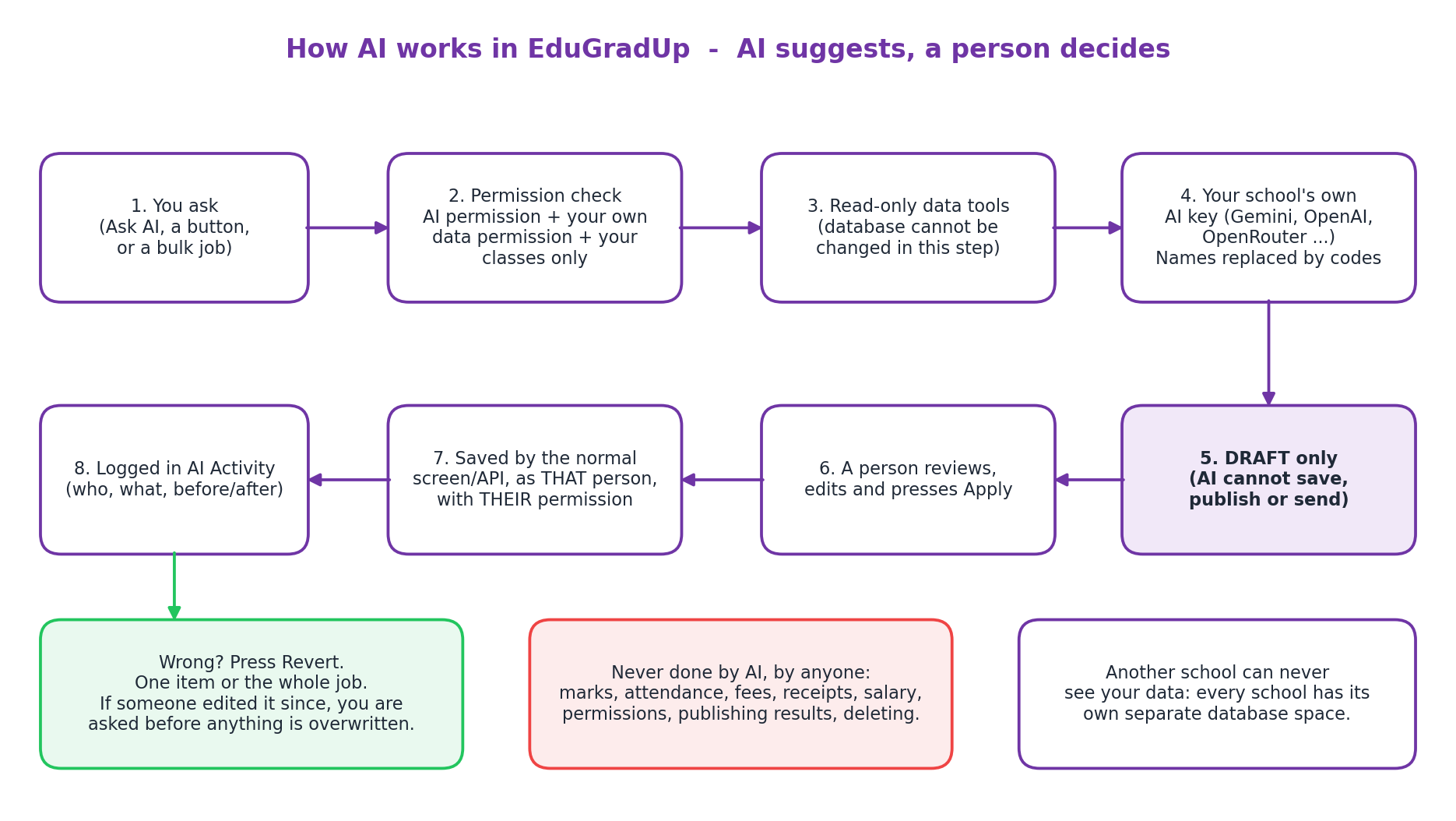
Schools worry about AI touching marks, fees or attendance. EduGradUp is built so it cannot. The AI reads what the person is allowed to see, writes a draft, and stops. A person reviews and presses Apply.
AI can make mistakes. Always read drafts, question papers and suggested marks before using them.
Thirteen helpers inside the screens your staff already use. Every text feature can write in English, Hindi or Hinglish. See also report card software.
Ask about attendance, marks, fees or staff in plain English, Hindi or Hinglish. Answers show which data was used.
Bulk remarks per student from marks trend, attendance and co-scholastic grades. Names never sent.
CBSE, BSEB, ICSE and State boards in English, Hindi or Hinglish. Answer key PDF and OMR sheet.
Write, improve, shorten for WhatsApp, and translate Hindi to English or back. Sending stays your button.
Draft objectives, activities, a 4x4 rubric or a homework description into the form you already use.
A one-page summary for a parent-teacher meeting from the student's marks and attendance.
Draft a polite reminder for one family. Real name and amount are filled in by EduGradUp.
Drafts a reply from your own policy documents. A person sends it on WhatsApp.
Photo of a paper form into editable fields. Nothing is saved until you check and copy it.
Suggests marks and feedback on one answer. The teacher decides and enters the mark.
Absent teachers, missed periods and ranked free teachers, computed from the timetable.
A transparent score with reasons: low attendance, falling marks, long-overdue fees. AI only explains.
Attendance, collections, staff present and approvals in a few lines.
Three checks must all pass: the person has the AI permission, already has the normal permission for that data, and teachers see only their own classes. AI never shows anyone more than they can already see.
| Role | Default AI access |
|---|---|
| Principal / Admin | Everything: school-wide questions, morning brief, fees, staff and HR, all AI activity, revert. |
| Teacher | Writing help, report card remarks, question papers, and questions about their own classes only. |
| Accountant | Writing help such as reminders and notices, and questions about fees and accounts. |
| HR Manager | Writing help and questions about staff attendance, leave and payroll summaries. |
The school admin can fine-tune any person under Permissions, AI Assistant.
No AI add-on fee and zero markup. You add your own key and pay your AI provider directly for what you use. EduGradUp shows usage by feature and person on the Usage tab, with monthly and daily limits you control.
Flat per school per year, never per student, excluding 18% GST: Nano ₹9,000 (up to 150 students), Starter ₹14,000 (up to 350), Standard ₹17,000 (up to 700), Pro ₹23,000 (up to 1,500), Enterprise custom. 15-day free trial. See pricing.
Set-up takes about ten minutes: add key, press Test, accept the notice, switch on the features you want.
Children's data deserves care. The AI Assistant is designed to send as little as possible, and to tell you exactly what it sends.
Each feature shows a Data sent line. Remarks, question papers and answer evaluation never send student names.
Student names become codes before text leaves EduGradUp. Phone numbers and e-mails are removed.
Activity records cannot be deleted and are kept for the period you choose (default 180 days). Set monthly and daily AI limits.
Pick a provider that suits your school's policy. Provider data terms differ, so check them. This page is not legal advice. See data security.
Comparing school ERPs? Ask every vendor the same questions. We state our own approach; for other vendors, ask them.
| Question to ask | EduGradUp approach | Other vendors |
|---|---|---|
| Whose AI key and bill? | Your own key, your provider bills you, zero markup | Ask the vendor |
| Can the AI write to the database? | No. Read-only mode, drafts only | Ask the vendor |
| Can AI actions be undone? | Yes, one item or a whole batch | Ask the vendor |
| Per-class permissions? | Teachers only their own classes | Ask the vendor |
See our full Fedena vs Entab vs EduGradUP comparison.
An AI school ERP is school management software with built-in AI helpers for everyday work: answering questions about attendance, marks and fees, drafting notices and report card remarks, and generating question papers. In EduGradUp the AI only reads data the person is allowed to see and only writes drafts. A person reviews and presses Apply.
No. The AI works in a read-only database mode where saving is impossible. It returns drafts only. Marks, attendance, fees, receipts, discounts, salary, users, permissions, settings, result publishing, promotions and deletion are never applied by AI. A person reviews every draft and applies it through the normal screen, as themselves.
Yes. The AI Assistant is included in every plan: Nano ₹9,000, Starter ₹14,000, Standard ₹17,000, Pro ₹23,000, and Enterprise on custom pricing, per school per year, excluding 18% GST. Pricing is flat per school, never per student. A 15-day free trial is available. AI usage is billed by your own AI provider, not by EduGradUp.
Your school creates its own key with an AI provider and adds it in AI Assistant, AI keys. The AI calls are made on that key, so you pay your provider directly. EduGradUp adds no markup on AI usage. The key is stored encrypted and only its last 4 characters are ever shown again.
Google Gemini, OpenAI, OpenRouter, DeepSeek, Groq, Anthropic Claude, Mistral, or any OpenAI-compatible service. You choose a fast model for everyday work and a smart model for questions and question papers, and you can switch provider later. Check each provider's data terms to suit your school's policy.
Yes. The question paper generator takes class, subject, chapters, board (CBSE, BSEB, ICSE or State), language (English, Hindi or Hinglish) and a blueprint of MCQ, True-False, Short and Fill questions. You review and edit each question, apply it to your Question Bank, and download the paper with answer key as PDF plus an OMR answer sheet. Hindi PDFs need the server's PDF engine.
Student names are replaced by codes before text leaves EduGradUp, and phone numbers and e-mails are removed. Report card remarks, question papers and answer evaluation never send student names. Each feature shows a Data sent line so the school knows exactly what goes to its provider.
Choose an exam and class. AI drafts one remark per student from the marks trend, attendance and co-scholastic grades, for the whole class at once. Teachers edit, tick the ones they want and press Apply selected. Revert all undoes the whole batch if needed.
Three checks must all pass: the person has the matching AI permission, the person already has the normal permission for that data, and teachers see only the classes they teach. Accountants get fee questions, HR gets staff questions, principals get school-wide answers. AI never shows anyone more than they can already see on screen.
Yes. Every AI action is recorded in AI Activity with who asked, which data was used and what was finally saved, including before and after values. One item or a whole batch can be reverted. If someone edited the record afterwards, you see Before, Applied and Now and are asked before anything is overwritten. Messages already sent cannot be pulled back, which is why AI never sends on its own.
Yes. Each school has its own separate database space. A school's AI keys, questions, drafts and usage are never visible to another school, and AI tools cannot be pointed at another school's data.
Yes. AI can be wrong, so every output is a draft for a person to read before use. Always check question papers, remarks and suggested marks. For answer evaluation, AI only suggests marks and feedback and the teacher decides and enters the mark.
It drafts a reply from your own school knowledge documents, such as fee policy, admission FAQ and timings, and opens WhatsApp so a staff member sends it. If your documents do not answer the question, the draft says the office will confirm. Nothing is sent automatically.
EduGradUp is designed to limit what leaves the school: name-to-code replacement, per-feature Data sent notices, per-person permissions, audit logs with a retention period you choose (default 180 days) and encrypted keys. This is a product description, not legal advice. Consult your own advisor on your obligations.
15-day free trial. Add your AI key, switch on one feature, and see a draft in minutes.
Start 15-Day Free Trial See Pricing